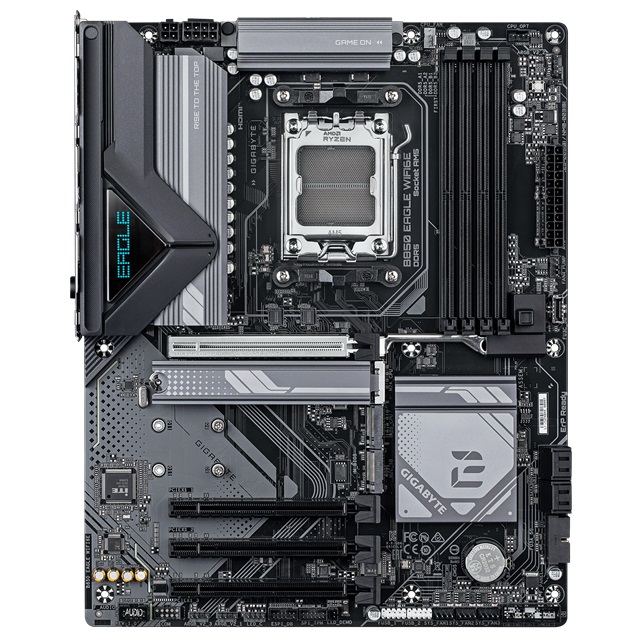
GIGABYTE B850M EAGLE WF6E MOTHERBOARD
B850 Chipset - Supports AMD Ryzen 9000 / 8000 / 7000 Series Processor - 2x M.2, 4x DDR5, 2x Internal USB 2.0 Header, 1x Internal USB 3.2 Header, 1x Internal Type C Header, Wi
| Warranty: 3-Year Warranty |
| Brand - Motherboard: Gigabyte |
| Socket: AM5 |
| PCIe x4 Slots: 1 |
| PCIe x16 Slots: 1 |
| Chipset: AMD B850 |
| Overclocking Support: Yes |
| Form Factor: ATX |
| Audio Codec: Realtek® Audio CODEC |
| Max. Memory Capacity: 256GB |
| Max. Memory Speed: 8200MT/s |
| Max. Memory DIMMs: 4 |
| Memory Type (: DDR5 |
| M.2 NVMe PCIe 4.0: 1 |
| M.2 NVMe PCIe 3.0: 0 |
| Total M.2 NVMe Slots: 2 |
| M.2 NVMe PCIe 5.0: 1 |
| Sata Ports: 4 |
| Bluetooth: Bluetooth 5.3 |
| Wifi: Wifi 6E |
| USB Type-C Ports: 1x USB-C 3.2 Gen2 (10Gbps) |
| USB Type-A Ports: 7 |
| Lan: 2.5 Gb/s |
| Optical S/PDIF: No |
Features
B850M EAGLE WIFI6E
- X3D Turbo Mode : Unleash new era gaming performance
- DDR5 OC up to 8200MT/s
- AMD Socket AM5 : Supports AMD Ryzen™ 9000 / 8000 / 7000 Series Processors
- Digital twin 8+2+2 phases VRM solution
- Dual Channel DDR5 : 4*DIMMs with AMD EXPO™Memory Module Support
- WIFI EZ-Plug : Quick and easy design for Wi-Fi antenna installation
- EZ-Latch Plus : PCIe and M.2 slots with Quick Release & Screwless Design
- EZ-Latch Click : M.2 heatsinks with screwless design
- Ultra-Fast Storage : 2*M.2 slots, including PCIe 5.0 x4
- Efficient Thermal : VRM Thermal Armor Advanced & M.2 Thermal Guard
- Fast Networking : 2.5 GbE LAN & Wi-Fi 6E with directional Ultra-high gain antenna
- Extended Connectivity : HDMI, 2*Displayport
- PCIe UD Slot : SMD PCIe 5.0 Armor for enhanced graphics card support

Performance

Thermal

Connectivity

DIY Friendly

Brand New Gaming Experience - X3D Turbo Mode
Unleash New Era Gaming Performance with One-Click Activation.
X3D Turbo Mode's unique optimization parameters allow even Ryzen™ 9000 X3D gaming Performance enhance & Ryzen™ 9000 non-X3D processors to achieve similar gaming performance levels as their Ryzen™ X3D counterparts. Experience smoother gameplay, higher frame rates, and reduced latency with GIGABYTE's BIOS innovation- X3D Turbo Mode.
One-Click Acceleration :
Enhance Gaming FPS Performance with a single click.
- Enhance Up to 18%
* Differences in performance enhancement depending on the game.
AI Overclocking For peak performance
AORUS AI SNATCH
Unleash Ultimate Performance with One-Click Activation.
* Coming soon

Auto CPU & DDR5 Memory Boost
With just a
single click, unleash the full potential of CPU & DDR5 memory,
instantly boosting your gaming and work efficiency.
One-Click Acceleration:
Enhance CPU & DDR5 speeds with a single click.
- Real time Analyze
- OC accuracy UP
- EZ to Pro
- Fast AI Performance
- Enhanced Computing Power
- EZ to Peak
- Safe OC
- Less Power Usage
Fast AI Performance
Accelerate AI processing for greater performance
- Up to 8% AI Performance*
- Accelerated AI decision-making
- Boosted reinforcement learning
- Streamlined language processing
*GeekBench AI PRO test conducted with High Bandwidth option manually enabled.
Boost CPU & Memory Performance
Raise system speed and performance.
- Up to 9% CPU & Memory Performance Boost
- Tailored-overclocking for your CPU and memory
- Faster data transfer and application loading
- Improved multitasking performance
- Optimized overall system performance
*Tested by AIDA64 Memory
**Tested by R23 Multi Core
Maximize performance in a snap
Enable users to easily become overclocking experts through a simple interface.
- EZ to Peak
Smart & Safe overclocking
Protect your motherboard through multiple over-temperature and over-current safeguards.
- OTP - Over Temperature Protection
- OCP - Over Current Protection
- OVP - Over Voltage Protection
- OPP - Over Power Protection
- UVP - Under Voltage Protection
- SCP - Short Circuit Protection
Less Power Usage Optimal power-efficiency
- Enhance Up to 9% CP/Per Watt*
With
faster computations, it also means reduced power consumption, making it
more environmentally friendly and energy-efficient, continuously
contributing to the well-being of our planet.
AI Design For MB signal enhancement
AI-Driven PCB Design
Redefining PCB Design with AI

AI-Driven PCB Technology -Redefining PCB Design with Artificial Intelligence
AI-Driven
PCB Technology employs AI algorithms to optimize vias, routing and
stackups. It ensures peak performance and signal integrity across single
and cross-layer throughout the design process.
- AI-ViaFusion Technology - Optimized vias & pads for signal integrity
- AI-Trace Technology - Smart routing for peak performance
- AI-Layer Technology - Tailored stackups for enhanced functionality
Key Features:
- AI-Generated Design Recipes
- AI-Driven Simulation
- AI-Powered Signal Verification
- Single and cross-layer signal optimization
AI-ViaFusion™ Technology - AI-Powered Excellence in Signal Integrity
Reduction in Signal Reflection Up to 28.2%
AI-ViaFusion,
an AI-assisted via optimization technology, determines optimal via and
pad sizes across PCB areas. This technology enhances cross-layer signal
integrity and transmission efficiency, outperforming traditional design
methods.
Best-in-class Signal Quality
- Superior signal transmission efficiency
- Dramatically reduced signal reflection
- Elevated signal quality and reliability
- Enhanced cross-layer PCB signal performance

AI-ViaFusion Technology - AI-Engineered Via Design Formula
AI-ViaFusion
is a proprietary AI-generated hybrid via structure design. This PCB
technology, validated through AI simulations and testing, aims to
enhance high-speed signal transmission.
- Optimized Via Design - Varied via sizes for optimized signal and power paths
- Driven Pad Optimization - Custom pad sizes for performance and production balance
- Precision Impedance Matching - Via & pad sizes selected for optimal signal impedance
Unlock AI-Powered Performance with AI-ViaFusion Technology
- Minimized Insertion Loss - Optimized vias reduce signal loss
- Enhanced Return Loss - Precision impedance matching reduces reflections
- Optimized Eye Diagram - Wider eye opening improves signal integrity
*Eye Diagram: Signal quality assessment tool in digital communications. Overlays bit cycle waveforms, forming eye-like pattern. Larger, clearer opening indicates better signal quality and transmission reliability.

AI-ViaFusion Technology - AI-Driven Revolution in PCB Design
Vias
(Vertical Interconnect Access) are critical for multi-layer PCB
connectivity. Via size significantly impacts signal integrity, affecting
capacitance, reflections, and crosstalk.
AI-ViaFusion Technology optimizes PCB performance through:
- Strategic Via Sizing - Optimized for varied signals across PCB
- Enhanced Impedance Matching - Precise control via machine learning
- Space Optimization - Maximized layout efficiency with signal integrity
AI-Trace Technology -Revolutionizing PCB Routing with AI
AI-Trace
Technology transforms PCB design by leveraging AI to optimize trace
routing, resulting in enhanced performance and signal integrity.
- Fiber Weave Effect Mitigation - Optimized signal synchronization
- Shielded Memory Routing - Optimized signal shielding and precision
- Impedance-Optimized Topology - Refined traces with minimal resistance
- Isolated Memory Routing - Optimized trace layout and layer separation
- Daisy-Chained Routing - Innovative design eliminates signal bottlenecks
Experience next-gen PCB routing with GIGABYTE's AI-Trace Technology.
Mitigating Fiber Weave Effect with AI-Trace Technology
Fiber
Weave Effect in high-speed PCBs stems from varying dielectric constants
of epoxy resin and glass fibers, this causes varying signal propagation
speeds, leading to signal integrity issues such as crosstalk and
jitter. AI-Trace Technology implements innovative routing angles to
mitigate this effect.
Benefits of Mitigation:
- Reduces signal distortion
- Improves transmission reliability
- Supports higher data rates
- Enhances overall system stability

AI-Layer Technology -Next-Generation Multi-Layer PCB Design
AI-Layer Technology creates innovative layer materials for multi-layer PCBs, delivering unparalleled performance.
Core Innovation:
AI-Optimized Layer Customized Design
- AI-optimized layer design
- Unique material for each layer
- - AI-verified signal integrity
- Tailored PCB for peak performance
Key Features:
- AI-optimized PCB layer and design material
- Server-Grade Low Loss PCB*
- Enhanced 2X Copper Technology
( * Low Loss for 8-layer PCB model only)

HyperTune BIOS
AI-Driven Advanced BIOS Optimization Technology
HyperTune BIOS - AI-Driven Advanced BIOS Optimization Technology - BIOS Efficiency Boost Up to 95%+
HyperTune
BIOS uses AI to optimize signals. The 800 series implements this for
peak efficiency, enabling significant memory clock speed boosts and
enhanced overall performance.
AI-Enhanced Performance Optimization
- Adaptive signal strength tuning
- AI tuning accuracy exceeds 95%
- Continuous learning advances performance limits
Experience GIGABYTE's AI-Enhanced HyperTune - Unleashing next-gen BIOS performance

Memory - Infinite Memory Performance
EAGLE motherboards boost DDR5 memory performance and offer top-notch compatibility using various advanced methods.
* Memory overclocking and XMP/EXPO support may vary. Please refer to the qualified vendor list (QVL) for details and note that product features may vary by model.
- DDR5 Overclocking Up to 8200 MT/s

Sturdy VRM Design - Steady Power
Eagle Series with steady power keeps your AI operation smooth.
Digital Twin VRM Design
Delivers consistent, high-powered performance to elevate your overclocking to the next level.
8 VCORE Phases DrMOS 60A
Unlock the full power of your multi-core CPU for unmatched performance.
*4+4 phases parallel power design
2 SOC Phase DrMOS 60A
Optimized for integrated GPU performance and memory management within the CPU.
2 MISC Phases Ppak
Deliver reliable power to your CPU-connected PCIe lanes for uninterrupted performance.

Cooling - Comprehensive Thermal
Advanced full-metal thermal design and durable heatsinks to keep your system cool and efficient.
Premium VRM Thermal Armor for Superior Cooling
"Stay Cool, Game On"
High-coverage MOSFETs with integrated molded heatsinks
4X larger surface area for enhanced heat dissipation
-
With up to 4 times the surface area of traditional coolers, this
advanced design significantly boosts MOSFET cooling performance.
5 W/mK thermal pad for efficient thermal conductivity
- High-performance thermal pad
- Keeps your system cool and running at peak efficiency
Multi-cut design with channels for improved airflow
- More grooves, more airflow.
- Better airflow, cooler system.
True one-piece heatsink design
- Outperforms competitors' multi-piece solutions
- Integrated design and expanded surface area deliver exceptional cooling performance

M.2 Thermal Guard
The M.2 Thermal Guard prevents throttling and bottlenecks from high speed M.2 SSDs as it helps to dissipate heat before it becomes an issue.

Small Vents, Big Cooling Power
* Test results are for reference only and may vary in different circumstances.
- Up To 7°C lower temperature

Smart Fan 6
Superior cooling performance and whisper-quiet operation for your gaming rig.
High Current Support
- Supports both PWM and DC fans, plus water cooling pumps
- Up to 24W (12V x 2A) capacity per fan header
- Built-in over-current protection
Precision Control
- Multiple temperature and fan speed points
- Customizable fan curves for optimal performance
Dual Curve Mode
- Choose between slope and stair modes
- Tailor cooling to your specific needs and preferences
Fan Stop Technology
- Fans can be completely turned off at low temperatures
- Ensures silent operation during light loads

Smart Fan 6 BIOS UI
Note: Images are for illustrative purposes and may differ based on your model.
Enhance Fan Curve UI
- 7 adjustable control points
- Expanded speed graph for precise adjustments
Slope/Stair Dual Graph Mode
- Slope mode: Smooth fan speed curve
- Stair mode: Steady speeds within temperature ranges
- Easy switching between modes
Manual Input
- Fine-tune fan speeds for optimal performance
- Precise control for enthusiasts
EZ Tuning
- Quick setup with 4 temperature and fan speed points
- Automatic optimization of fan curve
Fan Curve Profile
- Save personalized settings to BIOS ROM
- Maintain custom settings through BIOS updates

Easy & Friendly - Hassle-free Assembly
Our cutting-edge motherboard is designed for the ultimate DIY experience. Creating your own PC becomes a delightful and smooth process.
WIFI EZ-Plug
The WIFI EZ-Plug design integrates Wi-Fi antenna plugs into one adapter, EZ to install.

EZ-Latch Designs
User-friendly designs simplifying the assembly process.
* Images for reference only
M.2 EZ-Latch Click
screwless installation for M.2 heatsink

M.2 EZ-Latch Plus
screwless installation for M.2 SSDs

PCIe EZ-Latch Plus
Easy ejection with single click for graphics cards

Fast-Access Controls
Handy, Revert, Refresh
- EZ Debug Zone
- Q-FLASH Auto Scan

EZ Debug Zone
Centralized debug LEDs and control buttons provide a handy and organized troubleshooting process when building a new computer.
* Photo for reference only.

Optimal DRAM Installation Indicator
The DRAM Indicator LED will turn on when a module is installed into a non-recommended slot.

Q-FLASH Auto Scan
The new Auto Scan function featues when using USB flashdrive during Q-Flash, the BIOS file will be auto scanned instead of searching manually.

Q-FLASH PLUS
Effortlessly upgrade your BIOS without the need to install CPU, RAM, or GPU.
STEP 1
Connect the 24-pin and 8-pin power cables directly to the motherboard.

STEP 2
Download the motherboard's BIOS file,
rename it to 'gigabyte.bin', and store it on a FAT32-formatted USB
drive. Insert the drive into the Q-FLASH PLUS USB port.

STEP 3
Press the Q-FLASH PLUS button to trigger automatic BIOS updating.

Connectivity - All-round Connectivity
Experience ultimate connectivity with next-generation network, storage, and Wi-Fi solutions, delivering lightning-fast data transfer speeds.

2.5G LAN
design deliver blisteringly fast
transfer speeds to ensure the most stable transmission environment when
the system is performing cloud computing or providing external computing
services.
802.11ax Wi-Fi 6E
The latest Wireless solution
802.11ax Wi-Fi 6E with new dedicated 6GHz band, enables gigabit wireless
performance, provides smooth video streaming, better gaming experience,
few dropped connections and speeds up to 2.4Gbps. Moreover, Bluetooth 5
provides 4X range over BT 4.2 and with faster transmission.
Benefit of Wi-Fi 6E
- Dedicated spectrum in 6GHz band for less interference
- 4X better network capacity, no traffic jams especially in those dense area with lots of devices
- Network efficiency increase for better user experience

Wi-Fi 6E bring you the Ultimate VR experience!
Wi-Fi
6E brings faster Wi-Fi speeds, lower latency, and better battery life
for VR devices, which means streaming VR games wirelessly from your PC
to your VR device offers a lot smoother and has higher quality video.
Wi-Fi 6E compared to Wi-Fi 5 provide…
- 40% faster speed for smoother gaming/streaming experience
- 50% higher resolution for video game related content
- Better battery life for VR devices

Wi-Fi 6E Advantage
Spectrum congestion is huge
problem in current Wi-Fi environment nowadays because too many devices
all use existing 2.4GHz and 5GHz spectrum, and it cause unreliable
connection and slower speed. Wi-Fi 6E is extended standard to Wi-Fi 6,
and it use dedicated 6GHz band that it provides not only brand new
frequency to transfer data, but also spacious spectrum for future more
devices. With Wi-Fi 6E, users can enjoy faster connection and stronger
signal than before.

Immerse Audio
High-End Audio Capacitors
These high quality capacitors help deliver high resolution and high fidelity audio to provide the most realistic sound effects.

Audio Noise Guard
Essentially separates the board's sensitive analog audio components from potential noise pollution at the PCB level.

Ultra Durable™ - Born from Ultra Durable™
Technology embodies our commitment to excellence, providing gamers with a platform that's not only powerful but also built for longevity and reliability. GAMING series motherboards are engineered to endure and excel.
PCIe UD Slot
GIGABYTE's one-piece stainless-steel
shielding design reinforces the PCIe Slots, providing the extra
strength required to support heavy graphics cards.
- 1.7X stronger shearing test
- 3.2X stronger retention force test
- Reduced Signal Degradation with SMD Technology PCIe UD Slot

UD Power Connector
Our innovative UD Power Connector design enhances power conductivity and thermal dissipation.
- Solid Pins - Delivers superior conductivity and signal transmission and reduces metal wear from repeated connections.

Tailored Computing - Collaborative Excellence in Computing
GIGABYTE motherboards showcases our devotion to BIOS improvement. Through synergy with our user community, we democratize next-level computing power.
UC BIOS
Restructured with user-centered and intuitive performance adjustment mechanisms.
Multi-Theme
Now users can choose different BIOS
themes with one simple click It not only delivers an immersive user
experience but also offers a brand new user-friendly theme: Grayscale.

AIO Fan Control
Enable non-windows users to adjust AIO fan speed in the BIOS before entering the OS.
* Supports for AORUS WATERFORCE X II series AIO only

Refined BIOS Interface
GIGABYTE User-Centred (UC)
BIOS elevates the interface, delivering an optimized experience through
an easy-to-navigate layout and attractive design for optimal usability.

Quick Access Function
GIGABYTE UC BIOS' Quick
Access function selects brings 9 key options from Advanced Mode directly
into Easy Mode, enabling swift adjustments without extensive
navigation.

GIGABYTE Control Center
A unified software platform encompassing multiple GIGABYTE product.
RGB Fusion
Personalize the RGB illumination on your motherboard and connected peripherals.
Spotlight your flair
Liberate your imagination
using GCC's versatile illumination options for your motherboard. Tailor
your setup with eye-catching displays that mirror your unique
personality and preferences.

Varnish your shine
Programmable RGB LED
connectors enable precise control over individual LEDs (for ARGB GEN2
devices), seamlessly managed through the GCC.
* The information provided is for reference; please prioritize your specific setup and specifications.
1x RGB LED header
3x ARGB LED headers
AORUS & HWiNFO Co-branded OSD
AORUS and HWiNFO co-branded OSD(On-Screen Display) can display values as text or graphs in an overlay or independent window, also in full-screen applications and games, with no need for additional software installation.

Default AORUS skin
When using HWiNFO on a
GIGABYTE motherboard, a custom AORUS-themed interface automatically
activates, offering light and dark options. This AORUS Skin can be
manually applied to non-GIGABYTE boards as well.
*AORUS skin auto-applies when detecting a GIGABYTE motherboard.

Memory Timings Monitor
Thanks to the
collaborative efforts of GIGABYTE and HWiNFO experts, this sophisticated
monitoring tool now provides unprecedented detail in memory timing
readouts. This empowers users to closely track memory performance and
gather crucial insights.

Detailed BIOS information
GIGABYTE motherboard
users can now access comprehensive BIOS details in real-time through
HWiNFO. This includes toggle and tweaker statuses, as well as BIOS
versions. No need for system reboots to check BIOS info. anymore.

Features
Plug-and-play

Achieve high-quality audio by simply plugging in the USB connection.
Noise-canceling microphone
.png)
The flexible microphone reduces background noise for natural-sounding conversations.
Experience-digital-clarity
.png)
Bring all your favorite sounds to life with clear, digital audio.
More lifelike chatting
.png)
The flexible microphone reduces background noises, so your friends and family can hear more of your crystal-clear voice.
Pure-comfort
.png)
Enjoy unmatched comfort and the perfect fit with the lightweight, flexible headband.